🧙‍♂️ Brought to you by Peptides.gg — Use code UO20 for 20% off — GLP-1's, 90+ Peptides and more!

Why was the text font for Vendor Search items changed ?

Started by popps · 2024-07-26 · 10 posts · General Discussions
#0
I am used to the old one... do not like this font, how do I change it back to what it was ?


#1
LMAO  Then change it
#2
But how to change it ?

I have selected in the Options a different Font to the one which displays in VS (for speech, and I have the same one font also set for Tool-tips and Chat) but I cannot find where to set a font for VS items...

How can I change the VS font back to what it was ?

@Kyronix can you please help ?


#3
Omfg, you don't need help from Kyronix or a developer, just use your common sense mouse and click through the options. 

You'll end up with "Pop-up Help" eventually and chose the fonts there. Make sure you're using the short (100) "Delay before Tool-tip appears", so it's really fast and useful. 


*goes and faceplant for another day*
#4
Spoon Fed GIFs  Tenor
#5
Hate to break it to you guys, but popps is kinda right. All the fonts on Tool-tips are messed up, perhaps take some of your own advice and try it yourself. The font you selected in options is NOT what you get as a tool-tip font. They messed it up and looks like they got shuffled somehow. @Kyronix
#6
If any of you actually bothered to check besides roasting him, it does appear the fonts are completely broken. They dont match up to the correct fonts, and there seems to only be 2/3 fonts at all that work.
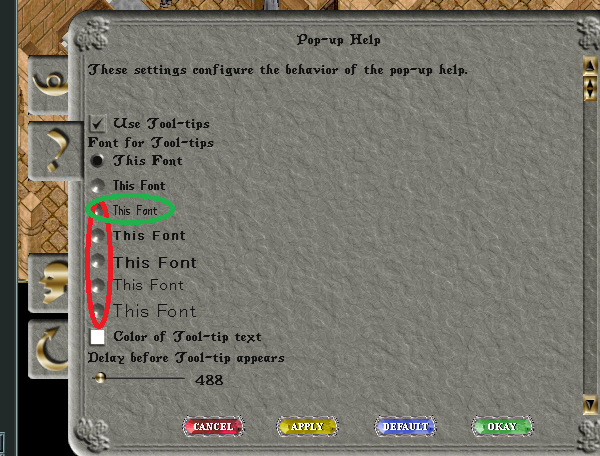
All of these appear to be the one circled in green.


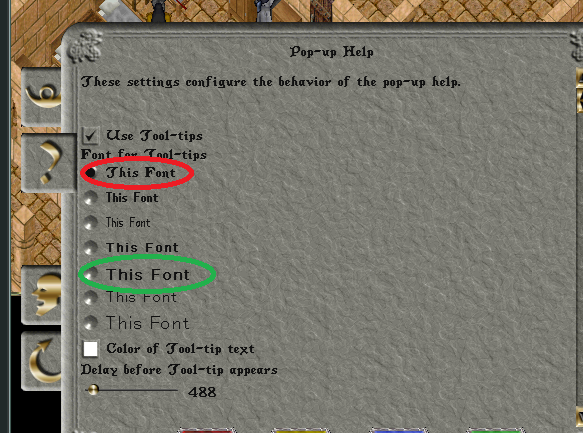
The original Default appears to now be the one which should be in green


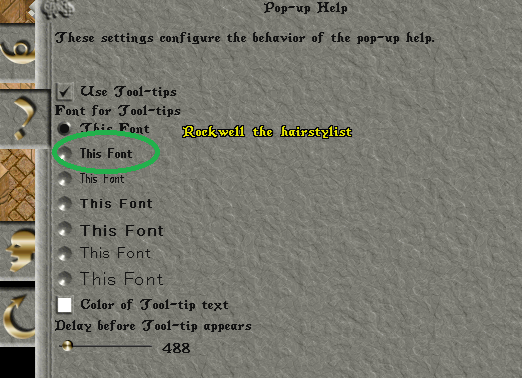
And this one seems to work properly
#7
Promathia said:
If any of you actually bothered to check besides roasting him, it does appear the fonts are completely broken. They dont match up to the correct fonts, and there seems to only be 2/3 fonts at all that work.
All of these appear to be the one circled in green.


The original Default appears to now be the one which should be in green


And this one seems to work properly

I had, as the selected one, the one which you circle in red in your 2nd picture yet, the font which displays (see picture in my OP), it looks to me, is the one which you circle in green, also in the 2nd picture.

Hence, as you correctly pointed out, something might not be working as intended with these fonts, just perhaps ?

By changing the Font to the one which you circle in green in your 3rd picture, it looks that I could get a better looking, more readable font to my eyes.

Nonetheless, it also appears to me that some issue might still exist with these Fonts which perhaps, just perhaps should be looked at ?
#8
Please report this as a bug either in the bug forum through email or through the bug reporting option in the help menu.
← Browse more General Discussions discussions